

Price-based Scheduling
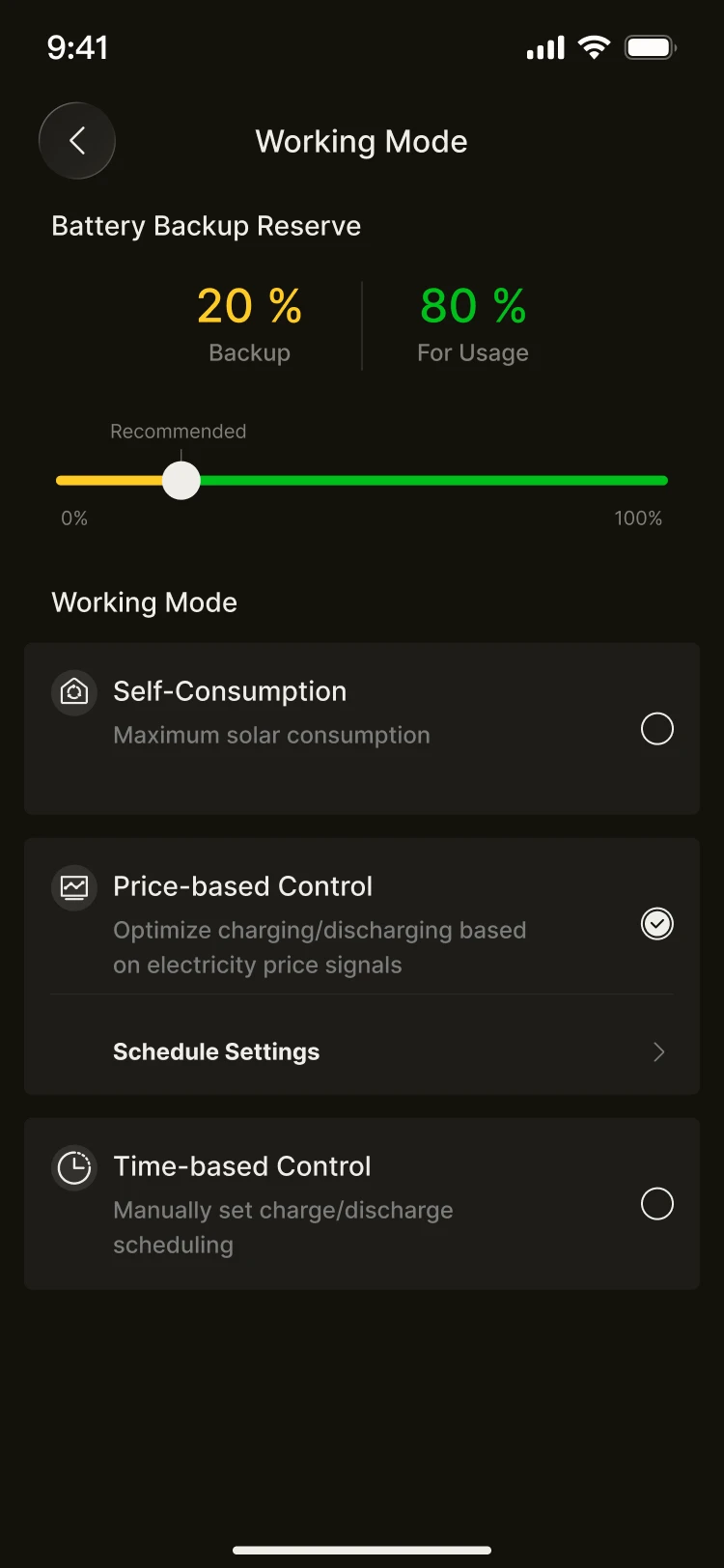
Price-based Scheduling supports two tariff sources:
- A time-of-use tariff (TOU) that you configure
- Dynamic tariff (Day-Ahead), using wholesale day-ahead market prices from one of the following sources, depending on your country:
- ENTSO-E Day-Ahead for Europe, covering the bidding zones for which the ENTSO-E Transparency Platform publishes day-ahead prices (see Regional availability below)
- AEMO NEM Pre-dispatch for Australia (NSW, QLD, VIC, SA and TAS)
INFO
Price-based Scheduling needs a tariff whose price changes over the day. Set your tariff in Utility Rate Plan first and choose either Time of Use or Trading Price. A flat rate cannot be used with this mode, as there are no price differences to schedule around. If no tariff plan has been set, the system will prompt you to complete your rate plan configuration first.
Operation with a “time-of-use tariff”
Suitable for regions where electricity prices vary by time period. The system can carry out the following actions in each period:
- Charge: store energy during periods when electricity is cheap
- Discharge: run your home from the battery during periods when electricity is expensive
- No action: carry out no operation
Setting a time-of-use tariff:
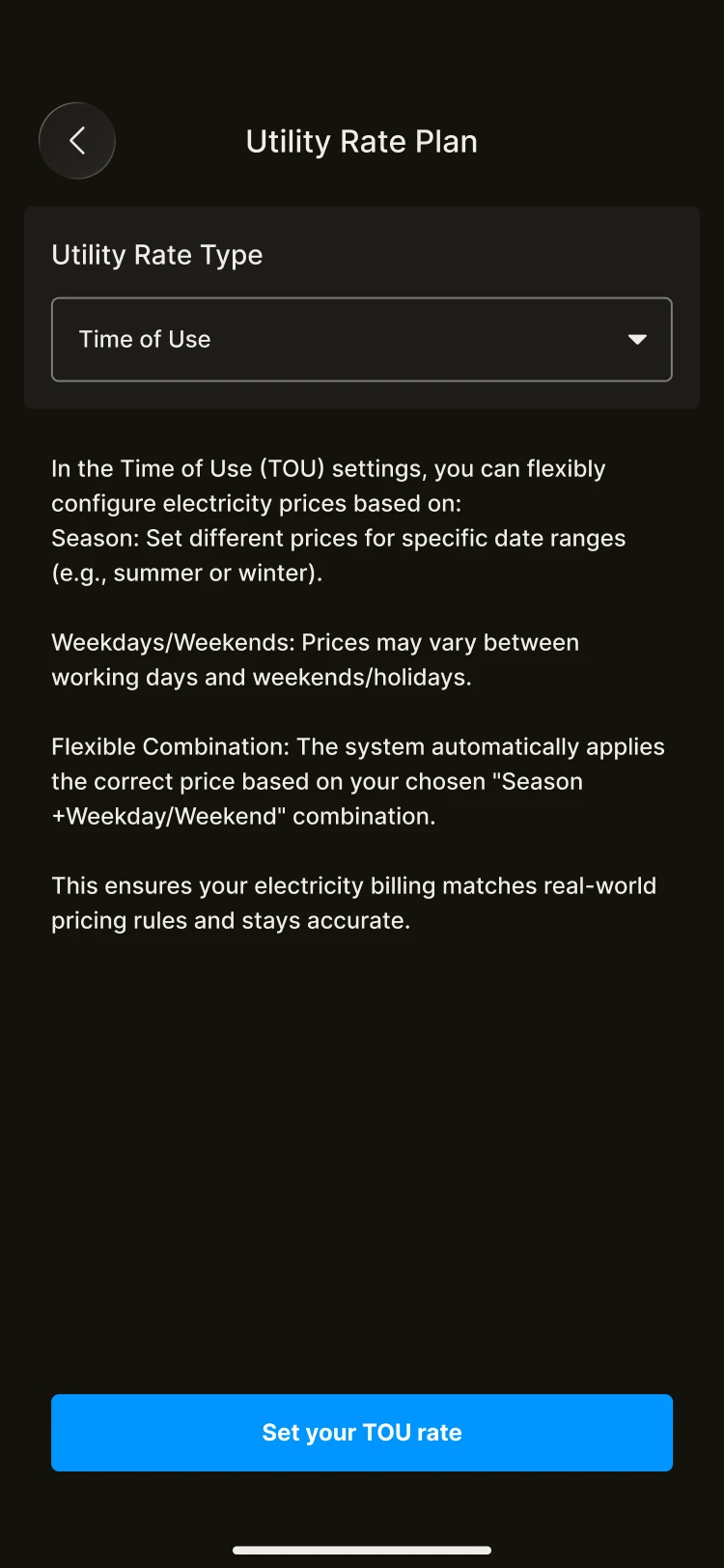
- Until you have set a time-of-use tariff in the tariff settings, you cannot define behaviour based on tariff periods
- Select “Time of Use” in the tariff settings and follow the steps to configure your tariff
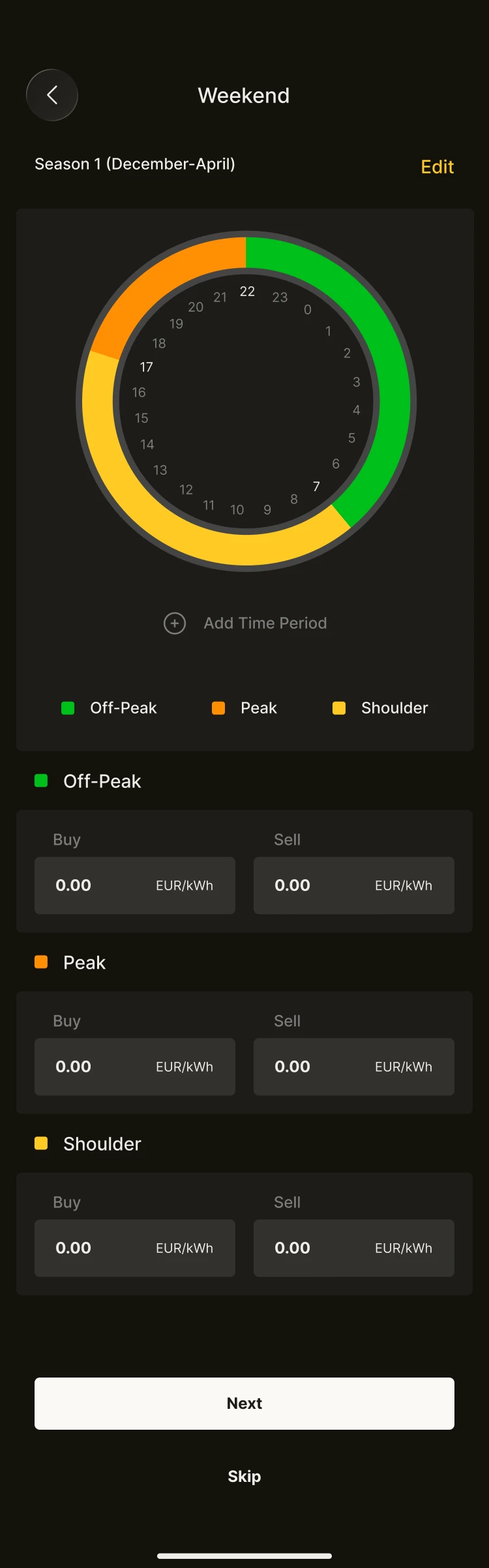
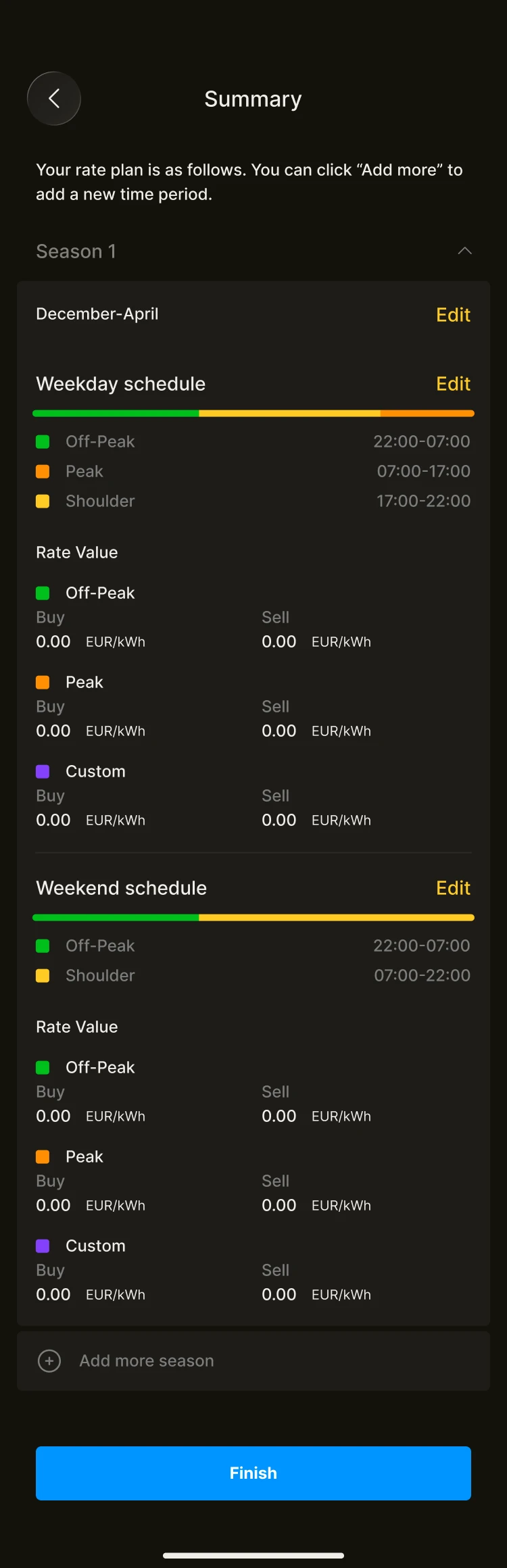
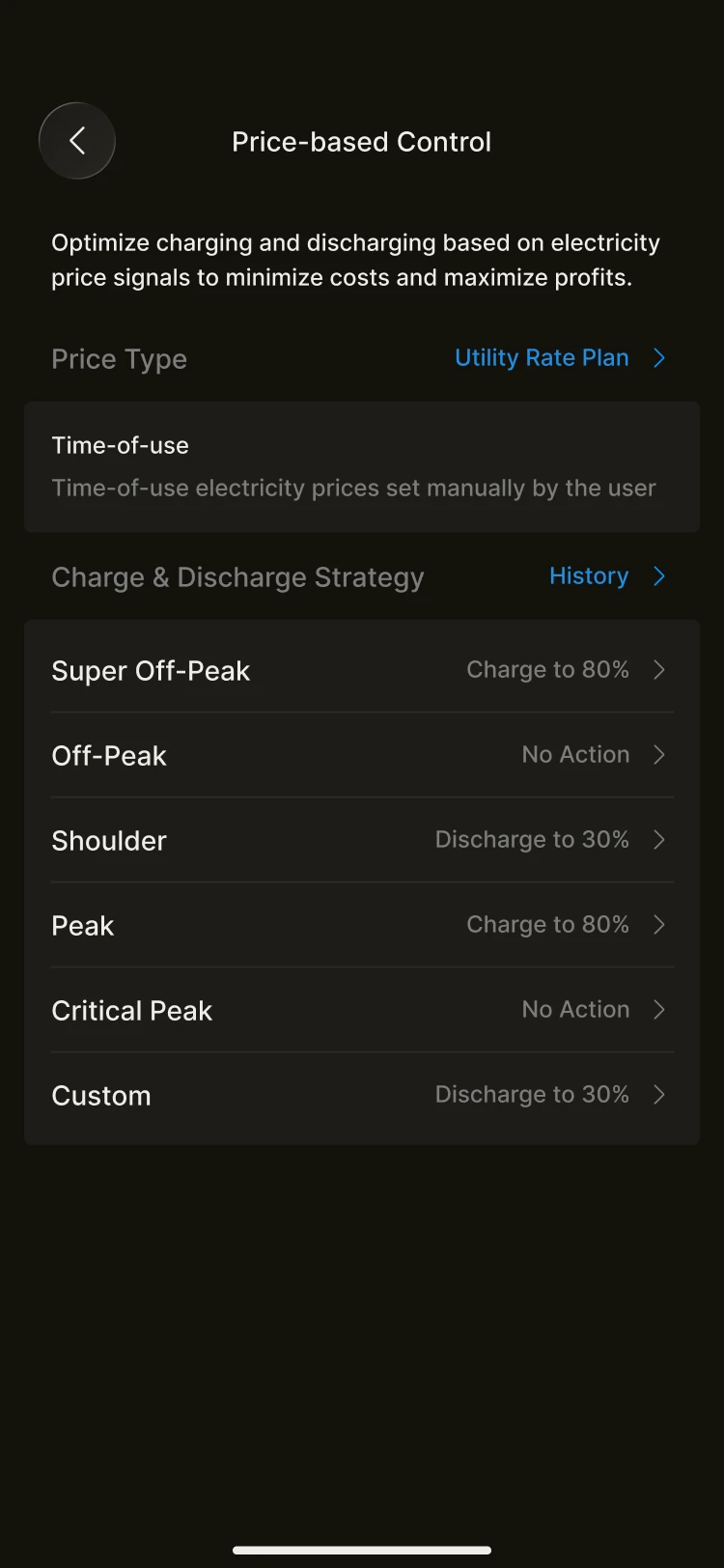
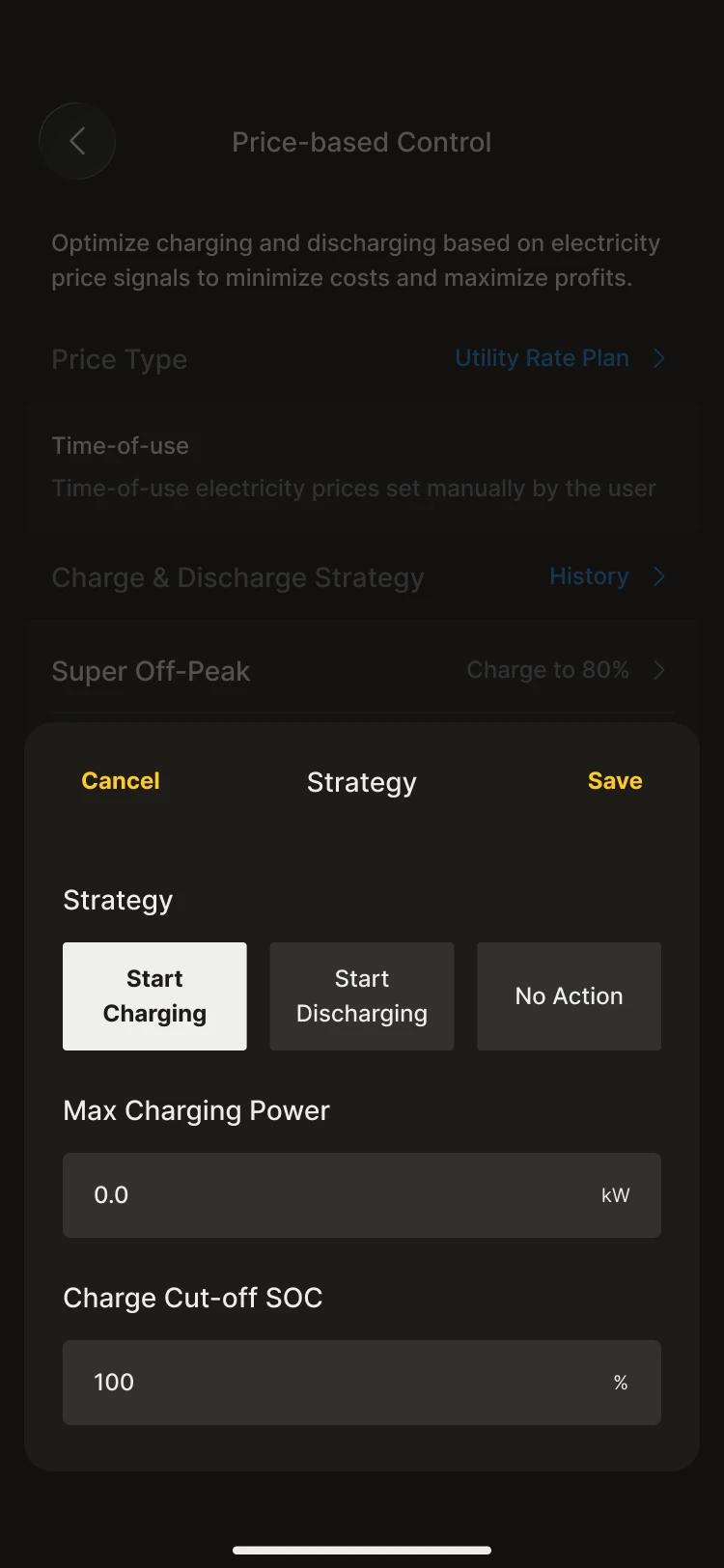
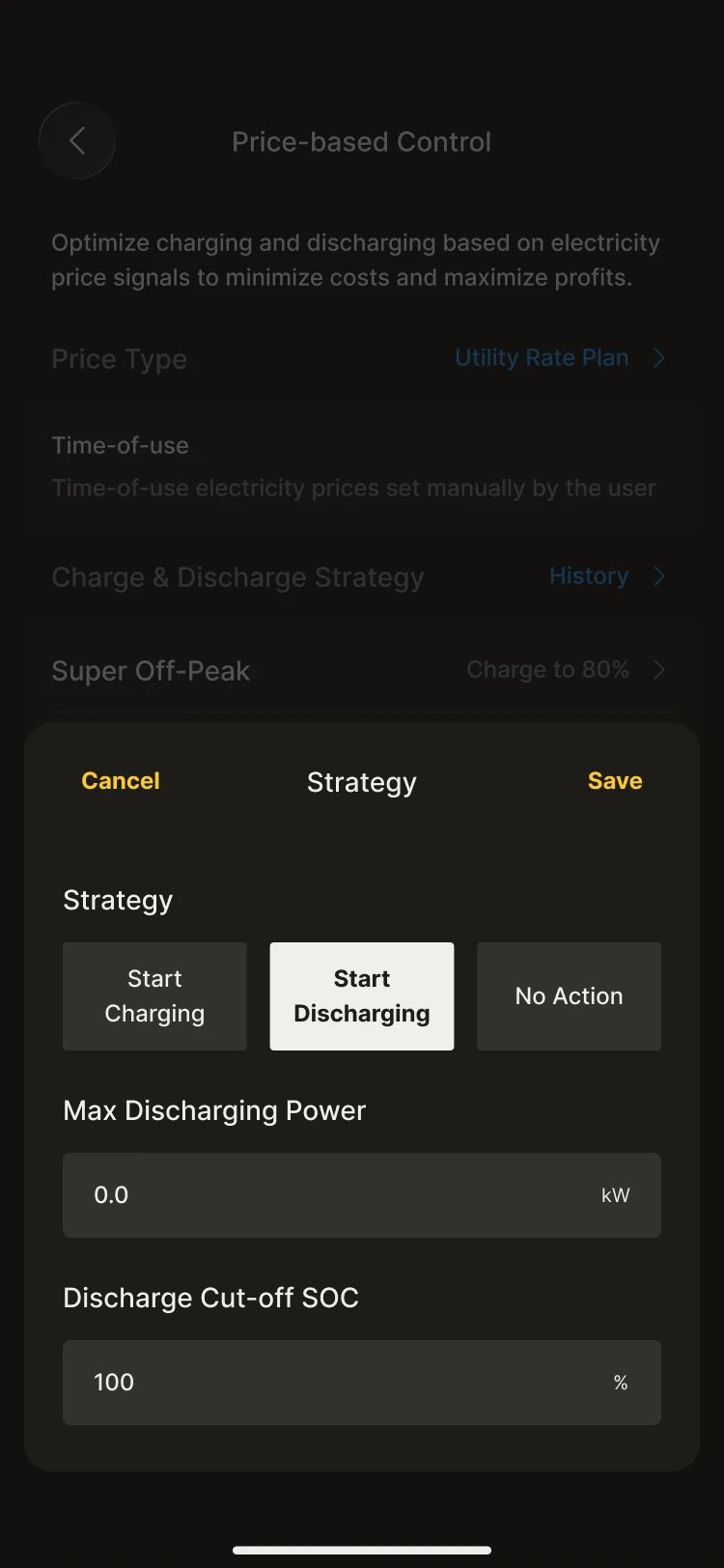
For each period, you can flexibly set:
- The maximum charge or discharge power
- The charge/discharge cutoff SOC
- Independent strategies for different tariff bands
This gives you full control over how the system behaves in every period.
Operation with a “trading price”
INFO
Dynamic tariff scheduling (Trading Price) is intended for countries and regions connected to a day-ahead electricity market, where prices change hourly or every 15 minutes.
Based on the following day’s day-ahead price curve, the system automatically optimises when your energy storage system charges and discharges, helping you reduce your electricity costs as prices fluctuate.
WARNING
Note: Before enabling this feature, please check your contract type and make sure you have a dynamic tariff contract in place. If your supplier bills you at a fixed price, scheduling by market price will not lower your bill.
In this mode, the system retrieves the following day’s day-ahead price curve (at hourly or 15-minute resolution) each day and schedules charging and discharging accordingly.
Setting up a trading price
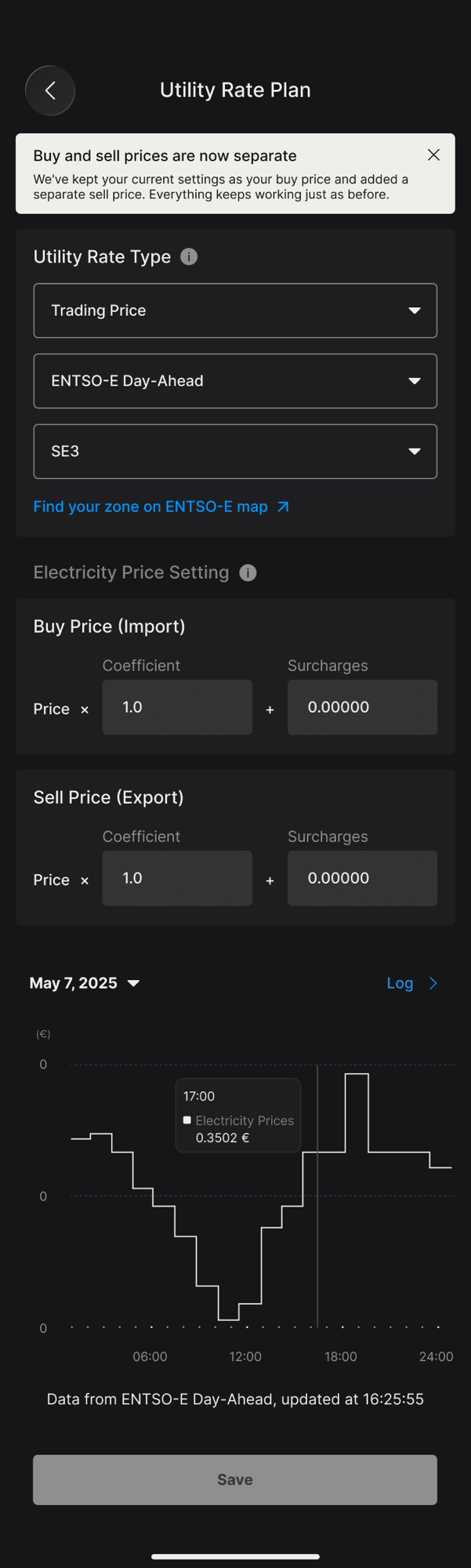
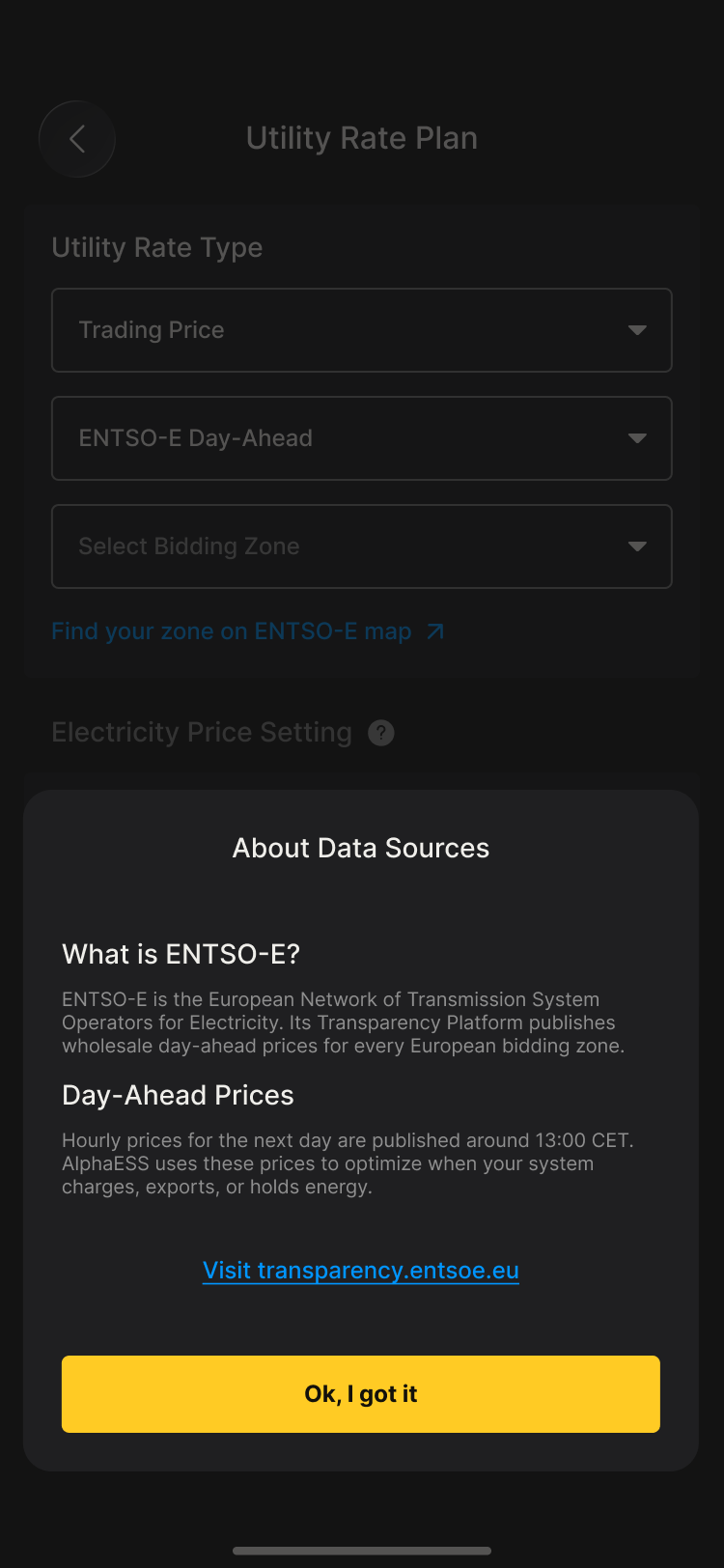
- Open Utility Rate Plan and set Utility Rate Type to Trading Price.
- Select the data source for your country (ENTSO-E Day-Ahead in Europe, AEMO NEM Pre-dispatch in Australia).
- In Sweden, Norway, Denmark and Italy, the wholesale price differs by bidding zone, so you must also select your Bidding Zone (for example SE3, NO1, DK2). Nothing is pre-selected: the field shows Select Bidding Zone until you choose one. Use Find your zone on ENTSO-E map to look up the zone for your address. In all other European countries there is a single zone and this step does not appear.
- If your contract price is not the raw market price, enter your buy and sell coefficients and surcharges (see Contracts not based directly on trading prices below).
- Save, then return to Working Mode and select Price-based Control.
Tap the ⓘ next to Utility Rate Type at any time to read a short explanation of ENTSO-E, bidding zones and day-ahead prices.
How tariff bands are determined
Once the system has retrieved the price data for the following day, it will:
- Sort the prices from lowest to highest
- Automatically calculate the following, based on the proportions you set under Price Range:
- The low-price band
- The high-price band
- The corresponding price split thresholds
- Dynamically generate that day’s Low, Regular and High price periods from the result
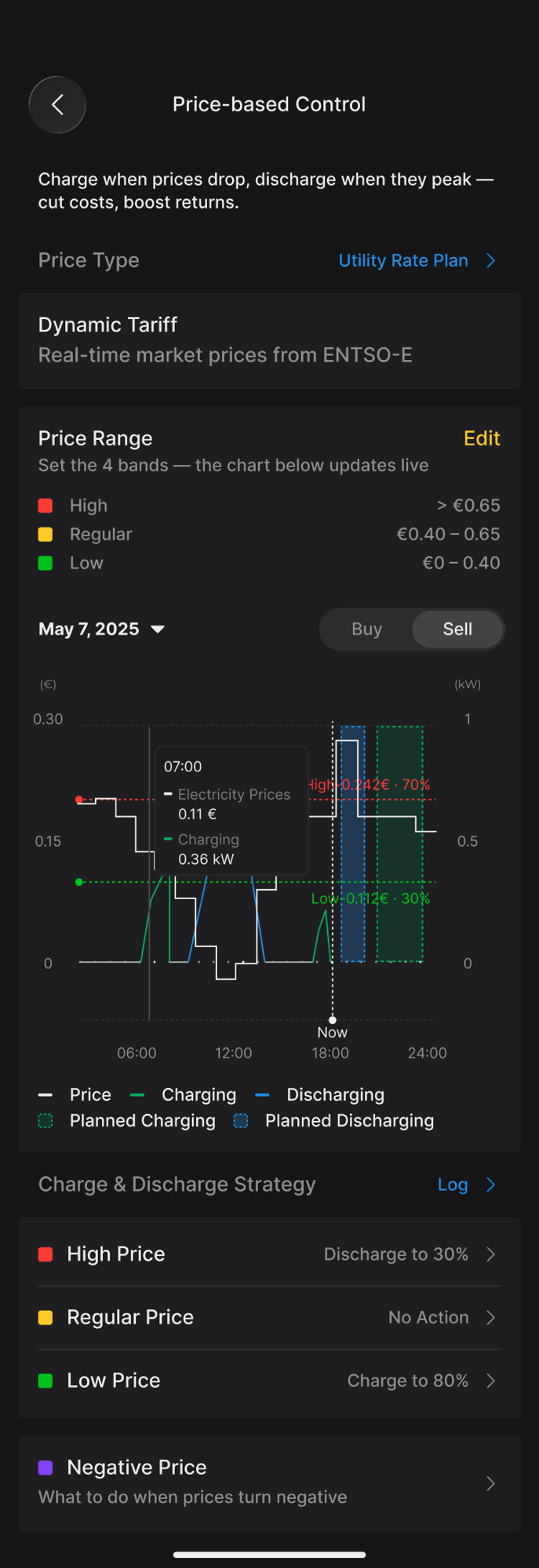
Because the bands are defined as a share of the day rather than as fixed prices, they follow the market automatically: on an expensive day the low band still marks the cheapest hours of that day. The price chart shows the resulting high and low threshold lines for the selected day, so you can check exactly which periods will trigger each action.
The whole process requires no manual intervention and updates automatically as market prices change.
Charge & Discharge Strategy
Under Charge & Discharge Strategy, choose an action for each of the three bands. The system then carries out that action in every period that falls into the band:
- Low Price → typically charge, to store cheap energy for later. You can set the maximum charging power and the charge cut-off SOC.
- Regular Price → typically no action. The battery follows your household consumption, exactly as in Self-Consumption.
- High Price → typically discharge, to run your home from the battery instead of buying expensive grid power. You can set the maximum discharging power and the discharge cut-off SOC. The battery discharges at the power you set: your home is supplied first and any remaining power is exported to the grid, so in a high-price period you can also earn from exporting.
The strategy list shows a summary of the current action for each band (for example Charge to 80%). Tap Log to review the actions the system has actually carried out.
Low & negative prices
In markets with a high share of renewables, wholesale prices can fall to zero or below. Under Low & negative prices you can decide how the system should respond. The two settings are independent of each other and are evaluated per price period:
- Stop export at low prices (on by default) – when your final sell price, with your coefficient and surcharges applied, drops to the Minimum sell price you set or below, the system stops exporting for that period and PV output is reduced accordingly, so you are not left unpaid, or even charged, for the energy you feed in. The default threshold is 0; you can set a positive value, or a negative one if your contract lets you tolerate small negative prices.
- Charge on negative prices (on by default where the system supports it) – when your final buy price is zero or below, the battery charges from the grid up to your configured target SOC, so you are paid for the energy you store.
Both settings work on whole price periods from the day-ahead curve, so the system does not switch back and forth within a period.
Contracts not based directly on trading prices
In some countries and regions, a customer’s tariff contract does not use the raw prices from the day-ahead market directly, but is instead positively correlated with the market trading price, for example:
Contract price = a × price coefficient + bWhere:
- a is the price coefficient
- b is a fixed additional item (such as a service charge, taxes or a premium)
The system also supports flexible configuration for these cases.
You can set the corresponding tariff adjustment items in the system, which are used to map the market trading price to your actual settlement price. The buy price (import) and sell price (export) are configured separately, each with its own coefficient and surcharge. If you leave the sell price at a coefficient of 1.0 and a surcharge of 0, the sell price equals the market price.
The system converts the day-ahead prices it retrieves using the parameters you set, and then applies its assessment and scheduling strategy to the converted prices.
The converted prices are used for:
- High/low tariff band calculation
- Price threshold assessment, including the Low & negative prices settings above
- Triggering charge and discharge strategies
This ensures the scheduling logic is always based on your true energy costs or revenue structure. Use Buy / Sell above the price chart to switch between the two converted curves.
INFO
Whether or not prices come directly from the trading market, the system can deliver consistent, reliable scheduling decisions through parameterised adjustment, as long as there is a clear mathematical relationship with market prices.
Regional availability
Europe (ENTSO-E Day-Ahead)
Day-ahead prices are published for the EU member states and the markets coupled with them. Availability follows the ENTSO-E Transparency Platform and expands automatically as new markets are added. Some ENTSO-E member countries have no day-ahead price feed on the platform, so Trading Price is not offered in Utility Rate Plan there. This currently applies to the United Kingdom (Great Britain), Iceland, Cyprus, Albania, Bosnia and Herzegovina, Montenegro, North Macedonia, Moldova and Türkiye.
Australia (AEMO NEM Pre-dispatch)
Available in the five National Electricity Market regions: NSW, QLD, VIC, SA and TAS. Western Australia and the Northern Territory are not part of the NEM and are not supported. The Australian market publishes a single price, so the interface differs from the European one:
- Region is shown instead of a bidding zone, and there is no ENTSO-E map link
- There is no separate buy and sell price, and no coefficient or surcharge setting
- The price chart has no Buy / Sell switch
Band calculation and the charge and discharge strategy work in the same way as in Europe.
When tomorrow’s prices are not yet available
Tomorrow’s prices are set in the day-ahead auction and published by the market operator in your country, usually later in the day and sometimes not until the evening. The publication time is outside our control.
- Until they arrive, the Tomorrow view of the price chart stays empty and shows when the system last checked. Your Price Range and strategy settings remain editable, and your battery keeps running on today’s prices and your current strategy. Nothing is wrong with your system.
- If tomorrow’s prices still have not arrived by midnight, the battery runs on Self-Consumption until they do. Your settings stay unchanged and price-based control resumes automatically as soon as prices return.
- If today’s prices are missing, a banner appears at the top of the page, the chart shows no data and the settings are greyed out. The battery runs on Self-Consumption in the meantime, and the system checks for new data regularly and switches back automatically. In European markets the system first tries to fill the gap from a backup source, so a missing day is rare.
Tap About day-ahead prices on the price chart for this explanation inside the app.
Priority over other controls
Price-based Scheduling runs continuously in the background. Higher-priority controls, such as a forced charge or discharge issued by your installer or a VPP dispatch you have joined, temporarily take over the battery. Price-based Scheduling pauses while they run and resumes automatically when they end.